

Every developer has been there. You need to test an API endpoint. Maybe a frontend colleague says “the login endpoint is returning 500.” Maybe you deployed a new microservice and want to check if it responds. Or maybe you’re debugging why a third-party integration suddenly stopped working.
You could fire up Postman. You could write a Python script. Or — you could open your terminal and reach for the tool that’s been sitting there all along: curl.
curl is everywhere. It ships with macOS, Linux, and even Windows 10+. It speaks HTTP, HTTPS, FTP, and a dozen other protocols you probably don’t need. But for API testing, curl is the fastest, most reliable tool you’ll ever use — once you know a few key patterns. Here they are.
The Foundation: GET Requests
The simplest curl command is a GET request. It doesn’t get simpler than this:
curl https://jsonplaceholder.typicode.com/posts/1That spits the response body straight to your terminal. Useful for a quick check, but in practice you’ll want more control. Here are the flags I use every day:
# Save response to a file
curl -s -o response.json https://api.example.com/data

# Show HTTP status code alongside output
curl -s -o response.json -w "HTTP %{http_code}
" https://api.example.com/data

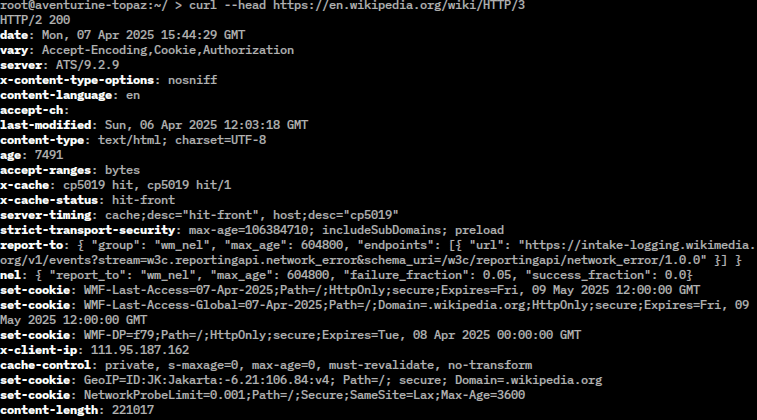
# Fetch only response headers (great for checking CORS, caching, content type)
curl -sI https://api.example.com/data
The -s flag silences the progress bar. The -o flag saves to a file instead of stdout. The -I flag fetches headers only — perfect when you need to check what caching headers a CDN is sending without downloading the full payload. Add -S (upper case) alongside -s to still show errors while keeping the progress bar quiet: curl -sS.
Sending Data: POST, PUT, and Friends
APIs rarely just give you data — you need to send it too. JSON is the lingua franca, and curl handles it cleanly:
# POST JSON data
curl -s -X POST https://jsonplaceholder.typicode.com/posts   -H "Content-Type: application/json"   -d '{"title":"My Post","body":"Hello world","userId":1}'   -w "
HTTP %{http_code}
"
The -X flag sets the HTTP method (GET is default). -d sends data in the request body. -H adds a header — and when you’re sending JSON, the Content-Type header is non-negotiable. Skip it and most APIs will reject your request or silently misinterpret the payload.
For PUT requests, swap the method:
curl -s -X PUT https://jsonplaceholder.typicode.com/posts/1   -H "Content-Type: application/json"   -d '{"title":"Updated Title"}'   -w "
HTTP %{http_code}
"
Need to send form-encoded data instead? Drop the Content-Type header — curl defaults to application/x-www-form-urlencoded for -d:
curl -s -X POST https://httpbin.org/post -d "username=felix" -d "role=developer"Pro tip: when your JSON payload gets complex — nested objects, arrays, special characters — build it in a file and reference it with -d @payload.json. This saves you from escaping nightmares in the shell. And if you’re piping curl output into jq to pretty-print or filter the JSON response, you’ve just assembled one of the most powerful ad-hoc API debugging pipelines available.
Headers and Authentication
REST APIs love authentication tokens stuffed into headers. Here’s how to pass them:
# Bearer token (most common for REST APIs)
curl -s https://api.example.com/protected   -H "Authorization: Bearer YOUR_TOKEN_HERE"

# Basic authentication (older APIs, internal services)
curl -s -u "username:password" https://api.example.com/admin

# Custom headers for API keys
curl -s https://api.example.com/data   -H "X-API-Key: sk-abc123xyz"
The -u flag handles Basic auth by base64-encoding the credentials for you — no manual encoding needed. For everything else, the -H flag is your universal header setter. You can stack as many -H flags as you need. I’ve had debugging sessions where I passed five headers to replicate exactly what a browser was sending — and curl handled it without complaint.
One thing that trips up newcomers: the order of flags matters for readability but not for functionality. curl doesn’t care if -H comes before or after -d. What does matter: when you’re testing endpoints that require authentication, always check the response status code. A 401 or 403 isn’t always a bad token — sometimes the endpoint expects the token in a different header, or the API key format changed. I learned this the hard way after 20 minutes of debugging what turned out to be a missing “Bearer ” prefix.
Debugging Like a Pro
When something isn’t working — and something always isn’t working — these patterns will save you hours.
Verbose Mode: See Every Byte
curl -v https://api.example.com/endpointThe -v flag prints the full HTTP conversation: request headers, response headers, TLS handshake info. It’s the first thing I reach for when an API call behaves unexpectedly. You’ll see exactly what headers were sent, what came back, and whether the connection itself is healthy. If you need even more detail — raw bytes on the wire — there’s --trace and --trace-ascii.
Timing Breakdown: Find the Bottleneck
curl -s -o /dev/null -w   "DNS: %{time_namelookup}s | Connect: %{time_connect}s | TTFB: %{time_starttransfer}s | Total: %{time_total}s
"   https://api.example.com/slow-endpoint
This one-liner tells you exactly where the latency lives. DNS resolution taking 2 seconds? Your DNS server is the problem. Time-to-first-byte is high but connection is fast? The application server is slow. This pattern is invaluable when your API feels sluggish but you can’t tell whether it’s the network, the DNS, or the backend. Combine it with -w format variables like %{size_download} and %{speed_download} for a complete picture.
Following Redirects
curl -sL -o /dev/null -w "Final URL: %{url_effective}
" https://short.link/abc
The -L flag follows redirects — without it, curl stops at the 301/302 response and you wonder why the body is empty. The -w variable %{url_effective} shows you where you landed.
A Real Debugging Workflow
Let me walk through a scenario I hit last month. A cron job that called an internal API started failing. No error in the logs — just an empty response. Here’s the curl-based debugging flow that found the issue in under two minutes:
# 1. Quick check: does the endpoint even respond?
curl -s -o /dev/null -w "HTTP %{http_code}
" https://internal-api/data
# Result: HTTP 301  — ah, a redirect

# 2. Follow the redirect and check timing
curl -sL -o /dev/null -w "TTFB: %{time_starttransfer}s | Total: %{time_total}s
" https://internal-api/data
# Result: TTFB: 0.08s — fast, so the redirect target is fine

# 3. Does authentication still work?
curl -s -o /dev/null -w "HTTP %{http_code}
" -H "Authorization: Bearer TOKEN" https://internal-api/data
# Result: HTTP 401 — there's the problem

# 4. Verify the token endpoint still works
curl -s -H "Authorization: Bearer TOKEN" https://auth-server/verify
# Result: token expired — mystery solved
The cron job’s token was stale. The API returned 301 to an auth page, curl in the script didn’t follow redirects, and the error was lost because there was no status code check. Three curl commands found the root cause. No Postman, no browser dev tools, no log diving.
That’s the real value of knowing curl: not that it’s elegant, but that it’s fast. When something breaks, you don’t want ceremony — you want answers.
Why curl Wins
I’ve used GUI API clients. They’re great for exploring a new API with 40 endpoints you’ve never seen before. But for quick checks, debugging production issues, or scripting automated health checks, curl is unbeatable. It starts instantly. It’s scriptable. Its output is machine-readable by default. And if you’re pairing it with tools like tmux, you can keep a curl session open in one pane while you work in another — no context switching.
curl doesn’t need installation. It doesn’t need configuration. It’s been battle-tested for over 25 years. When I’m SSH’d into a server at 3 AM trying to figure out why the health check endpoint is returning 503, curl is the tool I trust. No GUI, no dependencies, no excuses.
The next time you catch yourself opening Postman to test one endpoint, try this instead: type curl -s -w " and see how much faster you get your answer. Then, when you need to build an automated test for that endpoint, you already know the curl command — wrap it in a Python test with pytest or a shell script and you’ve got yourself a monitoring check that took 30 seconds to write.
HTTP %{http_code}
" https://your-api/endpoint
curl is the Swiss Army knife you already own. Learn these patterns, keep them in muscle memory, and you’ll spend less time debugging and more time building.