

Last week, a set of npm packages posing as legitimate PostCSS utilities made their way into the registry. They looked real — convincing names, plausible descriptions, even a few hundred downloads each to look established. But under the hood, they were dropping a Windows remote access trojan on anyone who installed them.
This isn’t rare. It happens every week now. And as I covered in my breakdown of the Klue supply chain disaster, attackers have figured out that the fastest path into a target network isn’t through a firewall — it’s through a dependency.
The npm ecosystem is the largest software registry on the planet — over 2.5 million packages, serving everything from weekend side projects to enterprise banking infrastructure. That reach makes it a juicy target. Attackers know developers type npm install without a second thought. They know CI pipelines pull packages automatically. They know most teams have no dependency audit process at all.
I’ve been on both ends of this. As a developer, I’ve caught suspicious packages in team projects just by glancing at the package-lock.json diff during code review. As an ICT division manager, I’ve had to write the policy that says “nobody installs anything until it’s been checked.” Neither role is fun when you’re the one who has to say “we almost shipped malware to production.”
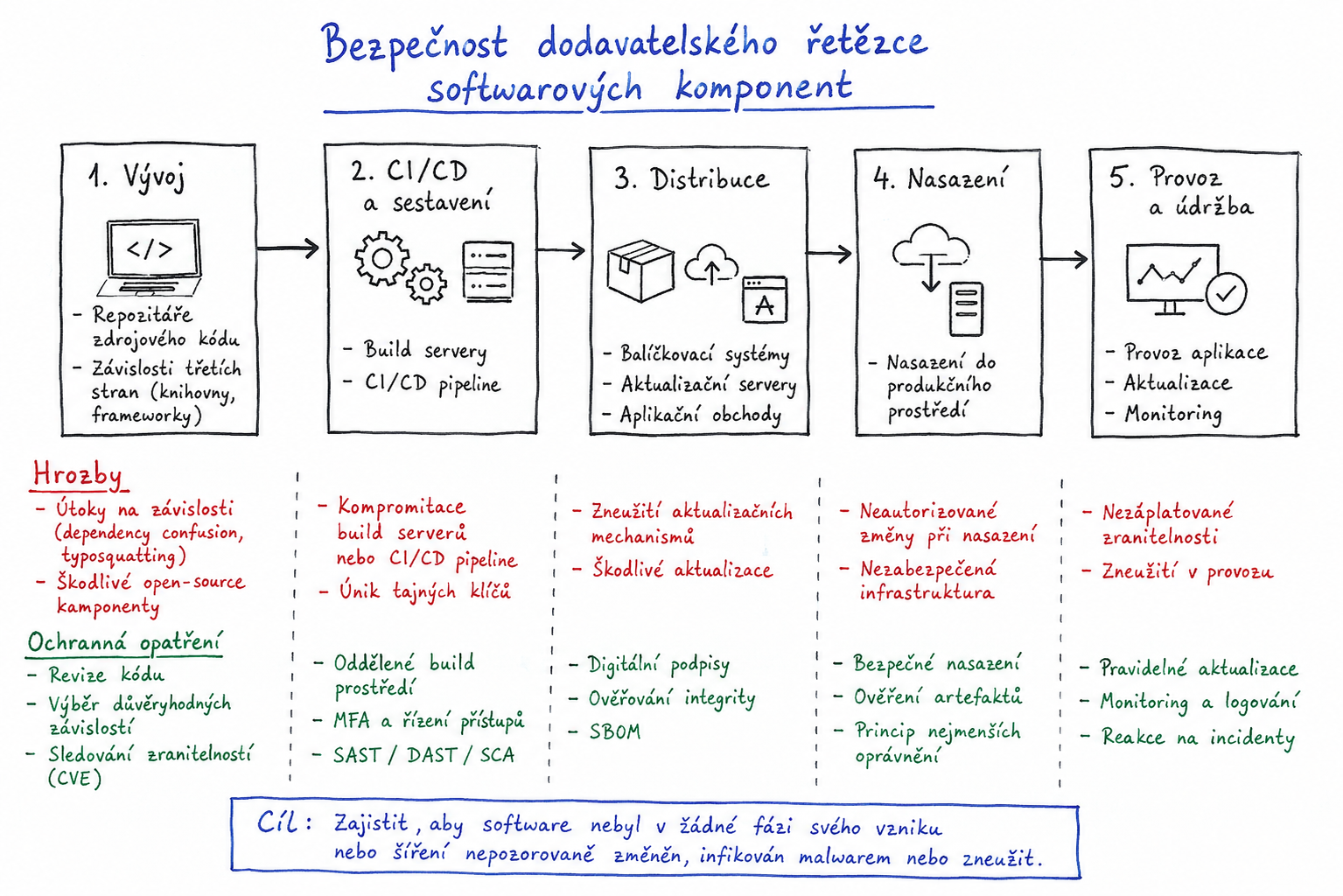
But here’s the thing — auditing your dependencies doesn’t require a security operations center. A few tools, a few habits, and about 15 minutes of setup will catch 90% of what’s coming at you. Here’s exactly how I do it.
Start With What You Already Have: npm audit
npm has shipped a built-in vulnerability scanner since version 6. It checks every package in your dependency tree against the GitHub Advisory Database and flags anything with known CVEs.
npm audit
Run it right now on any project that’s more than a month old. I’ll wait.
You probably got a wall of output — some low-severity regex denial-of-service bugs in testing tools, maybe a prototype pollution in a transitive dependency three levels deep. Most of it is noise, honestly. But every once in a while, there’s a critical CVE buried in something you installed six months ago and forgot about.
What npm audit won’t catch: brand-new malware that hasn’t been assigned a CVE yet. The PostCSS impersonators I mentioned? Zero CVEs. They were caught by researchers, not automated scanners. That’s why you need a second layer.
To automate the fix for the stuff audit does find:
npm audit fix
This upgrades vulnerable packages within their semver range. It won’t fix everything — breaking changes need manual review — but it’ll clear the easy stuff in seconds.
Integrate this into CI — just like setting up pre-commit hooks in Python, catching problems before they reach the repo saves everyone a headache:
npm audit --audit-level=high
Pipe that into your pipeline. If it returns a non-zero exit code, fail the build. No critical or high-severity vulnerabilities should ever reach production.
Lock Down Your Supply Chain With Socket
npm audit only knows about known vulnerabilities. What about the unknown ones? The packages that were uploaded yesterday with no CVEs but plenty of red flags?
This is where Socket comes in. Instead of looking at vulnerability databases, Socket analyzes package behavior — does it access the filesystem? Does it make network calls? Does it spawn shell processes? Does it use obfuscated code or install scripts?
Install their CLI:
npm install -g @socketsecurity/cli
Now scan your project:
socket scan .
Socket will flag packages that exhibit suspicious behavior — even if they’re brand new and have no CVE history. The PostCSS impersonators lit up like a Christmas tree under Socket’s analysis because they included native code execution, obfuscated payloads, and install scripts that downloaded external binaries. All three are massive red flags regardless of whether the advisory database knows about them yet.
Socket also has a free GitHub app that runs on every pull request. It comments with a list of new dependency risks right in the PR — typosquatting detection, install script warnings, native code alerts, and more.
Your Lock File Is a Security Tool — Treat It Like One
I still see teams committing package.json without the lock file, or worse, adding package-lock.json to .gitignore. This is a mistake.
The lock file pins every dependency — including transitive ones — to an exact version and an exact integrity hash. Without it, your CI pipeline could resolve a different version of a package than what you tested locally. Or worse: a registry compromise could serve a different package at the same version number.
Check if your lock file has integrity hashes:
cat package-lock.json | grep -c '"integrity"'
Every dependency in that file should have an integrity field — a SHA-512 hash that npm verifies on install. If the hash doesn’t match, npm refuses to install. This protects you against registry compromises where an attacker replaces a legitimate package tarball with a malicious one while keeping the version string the same.
One more thing: run npm ci in your CI pipeline, not npm install. The ci command is strict — it reads the lock file exactly and refuses to proceed if anything doesn’t match. npm install will happily modify the lock file, which means your CI might be installing different packages than what’s committed.
Verify Package Provenance With npm’s Built-in Support
Since npm 9.6 (shipping with Node.js 18), the registry supports Sigstore-based package provenance. When a package maintainer publishes from a trusted CI environment — like GitHub Actions — npm records a cryptographic signature linking the published tarball back to the specific commit and repository that built it.
Check if a package has provenance:
npm view express --json | grep -A5 provenance
Packages with provenance are far less likely to be malicious because the source repository and build process are cryptographically verifiable. An attacker would need to compromise the maintainer’s CI pipeline — a much harder target than simply publishing a lookalike package.
You can enforce provenance verification in CI:
npm config set signatures true
With this enabled, npm will refuse to install any package that doesn’t have a verified provenance attestation. This is aggressive — many legitimate packages haven’t adopted provenance signing yet — but it’s worth enabling for security-critical dependencies.
Automate Dependency Updates — But Audited Ones
Outdated dependencies are vulnerable dependencies. But blindly auto-merging dependabot PRs is how you accidentally ship a compromised package to production six hours after it hits the registry. We saw exactly how automated pipelines can be weaponized in the agentjacking attack pattern — the same principle applies to dependency updates.
The right workflow:
First, enable Dependabot or Renovate to open PRs for every dependency bump. You want visibility, not automation.
Second, review each PR. You don’t need to read the entire changelog of a minor patch version, but you should at minimum check:
- Is the new version coming from the same maintainer and repository?
- Does the diff look reasonable for the version bump?
- Has the package been flagged by Socket or npm audit?
- If it’s a new major version, what’s actually changed?
I do this review in about 30 seconds per dependency bump. It’s not deep research — it’s pattern recognition. A patch version that adds 30 new files and a native binding is not a patch. A package that suddenly changes its install script deserves a closer look. Nine times out of ten, the bump is fine. But that tenth time? That’s the one that would have been a post-mortem.
GitHub Actions: Protect Your CI Pipeline
As of June 2026, GitHub updated actions/checkout to block pwn request attacks that exploit the pull_request_target workflow trigger. If you’re using that trigger in any of your workflows — and if you run any kind of automated testing on PRs from forks, you probably are — update your checkout action immediately:
# .github/workflows/ci.yml
- uses: actions/checkout@v4
For extra safety, pin your GitHub Actions to specific commit SHAs:
- uses: actions/checkout@11bd71901bbe5b1630ceea73d27597364c9af683 # v4.2.2
This prevents a compromised action tag from injecting malicious code into your pipeline. Tags can be moved; commit SHAs cannot.
The 5-Minute Audit Checklist I Actually Use
When I start working on a project — new or existing — I run through this checklist before anything else:
- npm audit: Are there known vulnerabilities? Fix the critical and high ones immediately.
- Socket scan: Any packages with suspicious behavior patterns?
- Lock file check: Is
package-lock.jsoncommitted? Do all dependencies have integrity hashes? - Install script audit: Run
npm ls --depth=0and check any package with apostinstallscript. You’d be shocked how many legitimate packages run shell scripts during installation that you never read. - CI workflow review: Are you using
pull_request_target? Are actions pinned to SHAs?
That’s five steps, maybe 15 minutes, and it catches the vast majority of supply chain weaknesses.
What This Actually Looks Like in Practice
I sat down with a team member’s project last month — a small internal tool with about 40 dependencies. npm audit found two moderate vulnerabilities in dev dependencies. Fine, fixed with npm audit fix. Socket flagged one package: an SVG icon library that was using eval() at runtime. Not malicious — just badly written — but still a security risk I didn’t want in my codebase. We swapped it for a different icon library in 15 minutes.
The kicker was the lock file. The project had been running npm install in CI instead of npm ci, so the lock file had drifted. A transitive dependency was three minor versions behind what the lock file claimed. That means three releases of potential fixes — or new vulnerabilities — that nobody knew about.
We fixed all three issues in under an hour. The project is tighter, safer, and the team now knows exactly what to check before every install. That’s the real win — not any single tool, but the habit. These are the same developer instincts that help with tools like mastering awk for Linux text processing — once you build the muscle memory, you don’t even think about it anymore.
Malicious npm packages are not going away. The registry is too big and too open. But “open” doesn’t mean “helpless.” The tools exist, they’re free, and they take about as long to set up as it takes to drink your morning coffee.
Do the audit. Check the lock file. Look at what your dependencies actually do. It won’t catch everything — nothing does — but it’ll catch enough to make the difference between a quiet Thursday and an incident response call.