
Every so often a piece of history lands on my desk that I have to stop and stare at for a minute. Last year, Bill Gates did something I did not expect even from Microsoft’s fiftieth-anniversary celebration: he released the original source code for Altair BASIC — the very first product his company ever shipped. All 157 pages of scanned, yellowed fan-fold paper, free to download. I remember thinking, this is the code that started it all, and now I can actually run it.
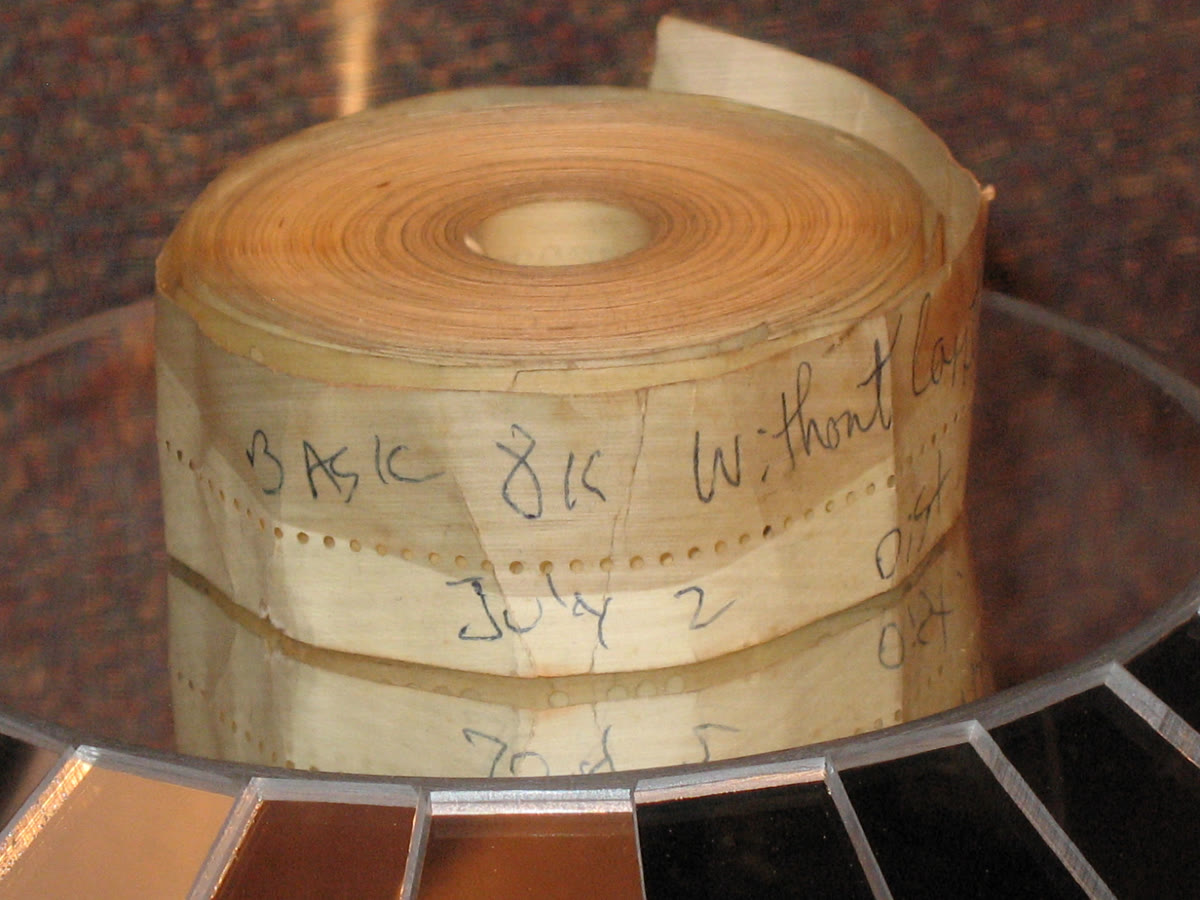

Here’s the thing that gets me, though. That program was written for a machine that took toggle switches on the front panel as its only input. You did not boot it like modern software. You flipped switches to enter a bootstrap loader byte by byte. So when you hear “Microsoft’s first product,” picture a language interpreter squeezed into four kilobytes of memory — my browser tab devours more than that before I’ve loaded a single article.
In this guide, I’ll show you how to run the original Altair BASIC on your own machine using the SIMH emulator. I tested the whole thing live on a bare Ubuntu box before writing this, so the commands below are the ones that actually worked. We’ll boot MITS Disk BASIC, type in a program, and watch it run — the same core interpreter Gates, Paul Allen, and Monte Davidoff wrote in 1975.
The 1975 origin story
The whole thing started with a magazine cover. In January 1975, Popular Electronics ran a story on the MITS Altair 8800, a $397 kit computer based on the Intel 8080. Gates and Allen read it and called MITS founder Ed Roberts claiming they already had a BASIC interpreter ready to show him. They did not have one. They had nothing but an idea and a willingness to bluff until it worked.
They wrote the interpreter on Harvard’s PDP-10 mainframe. Allen adapted an emulator he’d built for an earlier venture, Traf-O-Data, to simulate the 8080 chip before the real hardware reached them. Monte Davidoff, a fellow Harvard student, handled the floating-point math so it would fit the brutal memory limits. When the interpreter was done, they punched it onto paper tape and Allen flew to Albuquerque for the demo.
Here’s the part of the story that stuck with me: on the flight, Allen realized they had forgotten to write the bootstrap loader that reads the tape into the machine. So he hand-wrote it in 8080 machine language before the plane landed. They loaded it onto the Altair, and when it asked for memory size, they knew it worked. Imagine shipping a commercial product an hour after writing the bootloader mid-air.
Why this is suddenly runnable
You can’t transcribe a 1975 PDP-10 printout and expect it to boot, but you don’t have to. The community has spent decades building faithful emulators, and the archived software is freely available. It’s the same driven, test-it-yourself habit I’ve written about before when building a local AI text detector from scratch — the only way to trust something old is to run it yourself. For a deep history of the language, the Altair BASIC article on Wikipedia is a solid read that covers the versions and the royalties dispute.
For running it, we’ll use SIMH, a free, open-source computer-history simulator that models everything from PDPs to VAXes to the Altair 8800. It runs headless, which makes it perfect for a terminal tutorial. The disk images live on the altairclone.com downloads page, maintained by the folks who build Altair clones today.
What you’ll need
- A Linux or macOS machine (Windows works too through WSL) with
gcc,make, andcurl - The SIMH source code
- The MITS Disk BASIC 4.0 floppy image
- A couple of minutes of patience — the whole setup is under a minute
Step 1 — Get the simulator
Grab the SIMH source and unpack it:
curl -sL -o simh.tar.gz "https://github.com/simh/simh/archive/refs/heads/master.tar.gz"
tar xzf simh.tar.gz
cd simh-master
The Altair simulator is one specific build target, so we can compile just that piece instead of the whole suite:
make altair BUILD_SEPARATE=0 QUIET=1The build produces BIN/altair. If the build asks about installing libedit, just answer no — it’s an optional convenience for command history, not a requirement. On my test box the binary built cleanly in about a minute with no extra packages.
Step 2 — Grab the BASIC disk image
Now the actual disk that holds BASIC. The MITS Disk Extended BASIC 4.0 image is hosted on altairclone’s downloads directory:
curl -sL -o mbasic.dsk \
  "https://altairclone.com/downloads/basic/Floppy%20Disk/Disk%20Basic%20Ver%204-0.dsk" \
  -H "User-Agent: curl/8.0"
That’s a 330 KB S-100/Altair floppy image. You’ll boot it directly from the simulator — no real floppy drive needed.
Step 3 — Write the boot script
SIMH reads an initialization file, a single line telling it to attach the disk and start executing at the boot ROM address (octal 177400):
echo 'attach dsk0 /tmp/mbasic.dsk' > /tmp/altboot.ini
echo 'go 177400' >> /tmp/altboot.ini
Then run it:
/tmp/simh-master/BIN/altair /tmp/altboot.iniYou’ll be dropped into the SIMH command prompt. The go 177400 line we added jumps to the 2KB EPROM boot ROM, which loads Disk BASIC from the floppy and hands you control. The first thing BASIC prints is MEMORY SIZE? — hit Enter to accept the default, answer C to the line-printer question, and accept the disk defaults. A moment later you should see:
44644 BYTES FREE
ALTAIR BASIC REV. 4.0
[DISK EXTENDED VERSION]
COPYRIGHT 1976 BY MITS INC.
OK
That OK prompt is where it gets fun.
Step 4 — Run a program
Type a classic program in, then RUN it. This is exactly what I ran during my test:
10 PRINT "HELLO FROM THE 1970S"
20 FOR I = 1 TO 5
30 PRINT "COUNTER "; I
40 NEXT I
50 END
RUN
The output, straight from the emulator:
HELLO FROM THE 1970S
COUNTER  1
COUNTER  2
COUNTER  3
COUNTER  4
COUNTER  5
OK
Six lines of code, fifty years later, running on a faithful emulator. That tickle you’re feeling is the same one Gates described when he called this “the coolest code” he ever wrote. Notice Disk BASIC even tracks a line counter and reformats the print spacing — subtle engineering in what was, at heart, a four-kilobyte interpreter.
What this tells us about software ownership
Altair BASIC is also where the modern open-source-versus-proprietary tension was born. In early 1976, Gates published his infamous Open Letter to Hobbyists after Homebrew Computer Club members copied a pre-release tape and shared it around. His numbers were stark: development had burned through over $40,000 of computer time, yet fewer than ten percent of Altair owners had actually bought BASIC. “Most of you steal your software,” he wrote pointedly.
That letter set off a genuine philosophy war. Programmers split into camps that still echo today — and it’s worth a look back when we talk about who pays for code. The community answer wasn’t to pay up; it was Tiny BASIC, a deliberately free implementation meant to prove software could be shared without the whole ecosystem collapsing. You can draw a straight line from that movement to the open-source models and frameworks we run locally now — much like the way a self-hosted model router puts you in control of which models and providers you depend on.
Try it, then think about the journey
Running Altair BASIC takes five minutes, but the mental picture it leaves lasts longer. This was a team of three people, most of them under 22, working on borrowed mainframe time to build Microsoft’s entire first product in four kilobytes. I keep coming back to it when I’m tempted to whine about a slow build or a bloated dependency tree.
And it makes me appreciate the path apps took — from toggle switches to emulators to the tools we treat as ordinary. If the idea of running ancient software genuinely interests you, you might enjoy trying out how a local LLM benchmark compares to horsepower you can measure, or see what running a giant 770B model locally looks like when the constraints loosen. Different era, same instinct to run powerful software on your own machine.
That’s the part of computing that never gets old. Fifty years ago it was an interpreter on paper tape in a $397 kit. Today it’s whatever you choose to load onto a spare laptop — even agents that improve themselves from feedback. The tools change; the curiosity shouldn’t.