
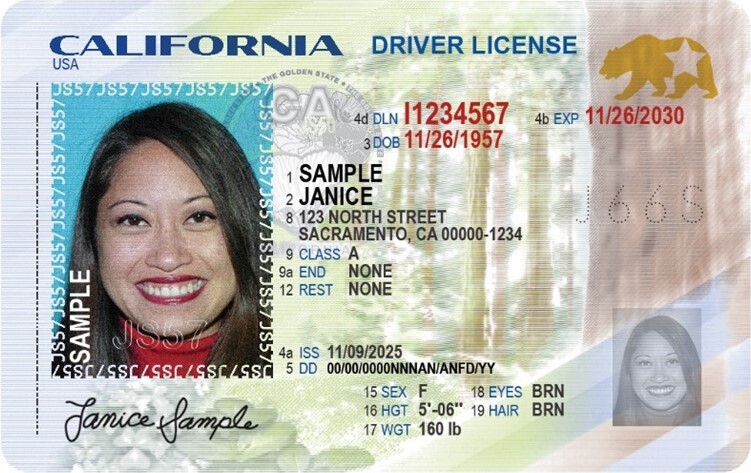
When I first saw the IDScan story pop up, my first thought wasn’t about the company — it was about everyone who had ever handed a bouncer, a dispensary, or a rental counter their driver’s license. That’s the uncomfortable reality of this one: it wasn’t a leak of emails or passwords you can just reset. It was a breach of the documents themselves. IDScan, the Louisiana identity-verification firm used by venues and retailers to check IDs, confirmed in early September that hackers pulled more than 150 million driver’s license records out of its cloud — full names, license numbers, and identity numbers from other documents like passports. If you’ve lived or done business in the U.S. or Canada, the safest assumption right now is that your file is in that pile. I covered the details of the breach itself in the news post on the IDScan incident, so I won’t re-litigate the timeline here. What I want to do instead is give you the exact, step-by-step way to respond — the same steps I walked through to tighten my own identity hygiene.
Start from the assumption that you’re in the file
You don’t get a choice about being affected. Instead of spending energy wondering, flip it: assume your driver’s license number, date of birth, and photo are already out there. That reframes everything. A stolen password is inconvenient. A stolen license photo plus your ID number is the raw material for new-account fraud, account takeover, and synthetic identities that are notoriously hard to untangle. When the Identity Theft Resource Center’s president said this could be one of the most extensive single leaks of driver’s license data ever, he wasn’t being dramatic — he was describing how long this kind of data stays valuable. So treat this as a wake-up call, not a reason to panic. The good news is that the most effective protections you can put in place right now cost nothing and take less than an hour.
Step 1 — Freeze your credit at all three bureaus
This is the single highest-impact move, and it costs you nothing. A credit freeze blocks lenders and creditors from pulling your credit report to open new accounts in your name. Since 2018, placing, lifting, and removing a freeze has been free nationwide. It lasts until you lift it, so it doesn’t expire on you.
The catch is that you have to do it at each of the three nationwide bureaus separately — Equifax, Experian, and TransUnion. Each has its own online freeze portal (myEquifax, Experian’s freeze and alert page, and TransUnion’s credit-help page). You’ll verify your identity, set a PIN or password, and you’re done. The FTC and the Consumer Financial Protection Bureau both publish the exact steps and contact numbers.
When you apply for a new card, a loan, or a mortgage, you just lift the freeze temporarily at whichever bureau the lender will check. You can schedule that lift or do it on the spot. It takes a few minutes and doesn’t hurt your score. One honest note: a freeze doesn’t stop someone from abusing an account you already have — it specifically closes the door on new credit in your name.
Step 2 — Add a fraud alert on top
A fraud alert is a lighter, free layer that works differently. It forces lenders who check your report to take extra steps to verify it’s really you before opening an account. An initial fraud alert lasts one year and is available to anyone who suspects they might be affected — and right now, that’s most of us.
The nice part: you only have to contact one bureau. The bureau you contact is legally required to tell the other two to place the alert on their files too. When you place an initial fraud alert, you also become eligible for a free copy of your credit report from each bureau.
If you confirm you’ve actually been victimized, you can escalate to an extended fraud alert, which runs seven years. That one requires an FTC identity theft report or a police report and file at IdentityTheft.gov, and it also pulls you off the prescreened credit and insurance marketing lists for five years. Combining a freeze with a fraud alert covers the two big doors: a freeze blocks the account opening, and an alert adds a human verification step on top.
Step 3 — Pull your credit reports free, every week
Freeze and alert do the heavy lifting, but you still want to catch anything that slips through. Through AnnualCreditReport.com, you can pull your report from each of the three bureaus for free every week — no strings, no credit card required. That’s a concrete habit to start now. Skim for accounts you don’t recognize, hard inquiries you didn’t make, and addresses that aren’t yours. It takes maybe ten minutes a week and it’s exactly how you spot problems early, while they’re still fixable.
Step 4 — See whether your data is already being traded
Another useful habit is checking your email address against known breach databases. The most trusted free service is HaveIBeenPwned. Type your email in and it tells you which past breaches it appears in. The site works on a principle called k-anonymity, which is worth understanding because it’s the same tech behind many secure lookups: when you check a password, your browser sends only the first five characters of its SHA-1 hash, and the server returns every matching suffix so you can compare locally. Your full hash never leaves your machine.
I tested that range endpoint live while writing this — it returned a normal HTTP 200 and a correct candidate list, and my test value came back clean. You can do the same check without leaking your password. The honest limits: HaveIBeenPwned catalogs known breached emails and passwords, not driver’s license scans. The IDScan data lives on a dark-web search site that Brian Krebs personally verified by looking up his own license, and it will likely resurface in other places for years. So use the free checkers to see what’s already public about you, but don’t mistake a clean result for a clean record. And please don’t go poking around the dark web to satisfy your curiosity — that’s a rabbit hole you don’t need to enter.
Step 5 — Brace for the phishing wave that’s coming
Here’s the part people underrate. Breaches like this feed directly into the shift where AI doesn’t just help hackers — it runs the attacks, a trend I dug into in that piece on AI-driven attackers. Attackers now have your real name, license number, date of birth, and photo. With that much detail, an unsolicited text or email pretending to be your bank, the DMV, or a “free ID protection service” is going to look genuinely plausible. It’s exactly the kind of message I wrote a checklist for in the Amazon scam verification post — the same rules apply here.
So before you click anything, slow down. Never use a link or number that arrived in the message; go to the official site or app yourself. Check the sender carefully, and treat any message that asks you to “verify” your license details or enter a code with suspicion. If a scammer already has your ID number, the point of their message isn’t to steal data you don’t have — it’s to get you to hand over the one thing you do have: a password, a verification code, or a payment. Remember that a legitimate company will never text you out of the blue to “lock your account” or demand an urgent code. If you want to get ahead of the AI-generated messages headed your way, the detector I built locally shows how these telltale patterns are actually caught. Expect the wave, and you won’t get swept up in it.
Step 6 — Guard your face and your ID photos from here on
The piece of this you can never get back is your photo. Facial-matching and document-scan systems increasingly use license images for identity verification, which is exactly why a stolen scan is so valuable — and why synthetic identity fraud, where a criminal fuses real data like your license number with a fabricated persona, is so hard for banks to detect.
Moving forward, be deliberate about where you hand over a scan of your ID. That doesn’t mean refusing legitimate checks — but it does mean asking yourself whether the thing asking for your full license needs it. When a service only needs to confirm you’re of age or a real person, question whether the front-and-back photo of your government ID is justified. If you ever do become a confirmed victim, file an identity theft report at IdentityTheft.gov — it gives you a concrete recovery plan and the document you need for an extended fraud alert.
If you run a business that verifies IDs
This breach is also a warning about contract design, and I say this as someone who manages IT. If your bar, rental desk, or online KYC flow outsources identity verification to a vendor, you just handed a third party your customers’ most sensitive data. That decision should come with pointed questions: how does the vendor encrypt data at rest and in transit, who has access, how do they detect a year-long intrusion, and — most importantly — how long do they keep records they no longer need? The hackers were reportedly exfiltrating new documents for roughly a year through a live pipeline. Length of retention directly controls the blast radius. The scramble to secure AI agents and the data they touch, which I wrote about after HiddenLayer’s funding round, is the same underlying problem: sensitive data moving through systems we don’t fully control.
The bottom line
You can’t un-leak a driver’s license. But you can decide how much damage your stolen data is able to do. Freeze your credit at all three bureaus, add a fraud alert, check your reports weekly, keep an eye on what’s publicly known about you, and steel yourself for the phishing that follows any big breach — the same way you’d double-check any message claiming to need your details, like the checklist I built for spotting fake Amazon alerts. None of it costs money, and most of it takes a single focused afternoon. Think of it like this: the attackers already spent a year getting your data. Spend one hour making it useless to them.